If you are new and find it difficult to check your MEPCO bill, you do not need to worry anymore. You just have to follow the steps given below and check it at once. We have explained every method separately and in a very easy way so that you have no confusion.
Check MEPCO Bill by Reference Number
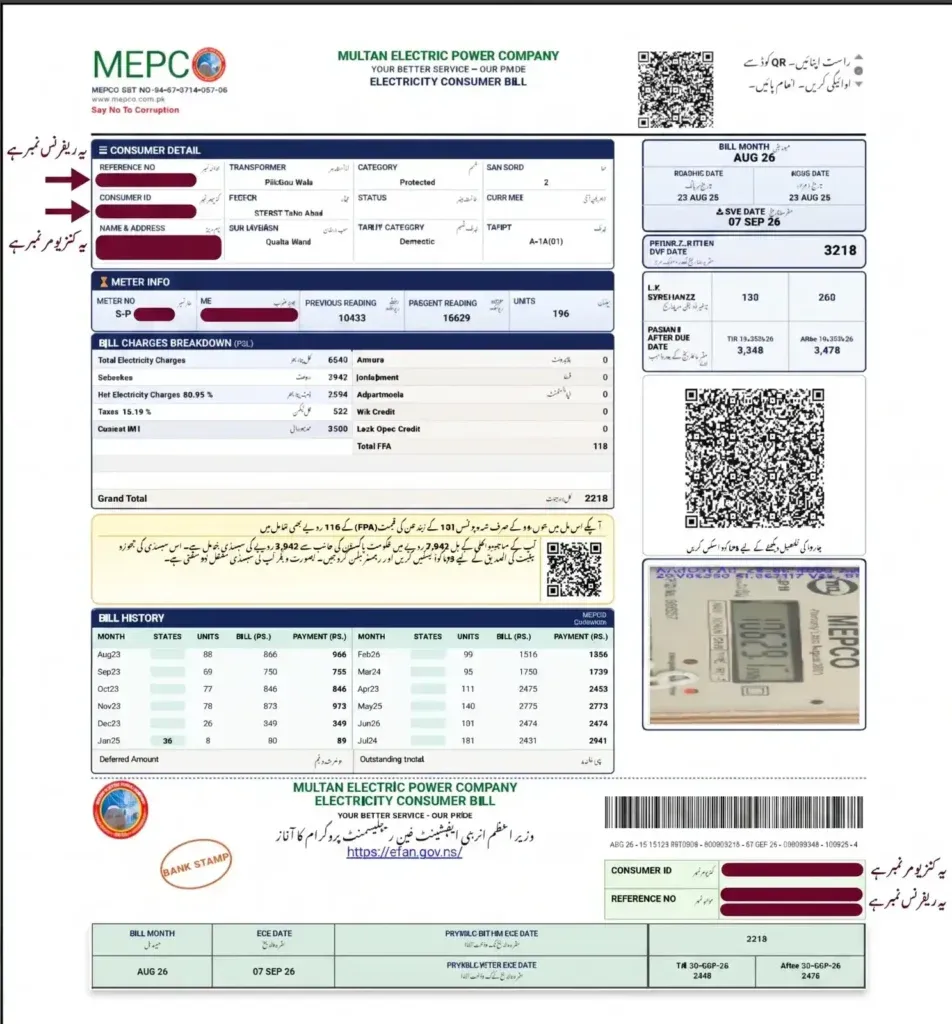
It is written at the very top in the "Consumer Detail" box on the top left side of your bill. You can identify it because it is only 14 digits long.
- Enter the reference number: First of all, write your 14-digit reference number in the box given above.
- Press Check Now: Then click on Check Now, and your bill will start loading.
- View the bill on the screen: Now your latest bill will show on the screen, where you will see the payable amount, due date, and units used.
Check MEPCO Bill by Consumer ID
The consumer ID is also written in the same box, below the reference number. It is 10 digits long and never changes, so you can easily remember it.
- Enter the consumer ID: Write your 10-digit consumer ID in the toolbox given above.
- Press Check Now: Now click on the search button.
- View the bill on the screen: In just a few seconds, your bill will show up, where you can see the current amount, due date, and paid or unpaid status.
Check MEPCO Bill via SMS
If you do not have internet, no problem. Now you can also find out your bill through SMS.
- Step 1 (Write the SMS): Open your text app and type
PITC, leave one space, then write your 14-digit reference number. Example:PITC 12345678910012. - Step 2 (Send it to 8334): As soon as you send the SMS, your request will go through.
- Step 3 (Wait for the reply): In a little while, you will get the bill amount and due date in a reply SMS, which you can view.
Download and Print Duplicate MEPCO Bill
- Step 1 (Open the bill first): Open your bill using any of the methods given above.
- Step 2 (Press Download or Print): As soon as the bill opens, click on the green print option at the top. Your bill will be saved to your phone storage at once.
- Step 3 (Take a printout): You can get a copy printed at any time and pay your bill physically at any bank or franchise.
Now MEPCO and the government have given 3 QR codes on the bill for your convenience, because of which the work of hours is done in minutes. You can pay your bill online from home, check it, and apply for subsidy to get relief. How to scan these QR codes is also explained below in steps. You just have to follow them.
Raast QR Code for MEPCO Bill Payment
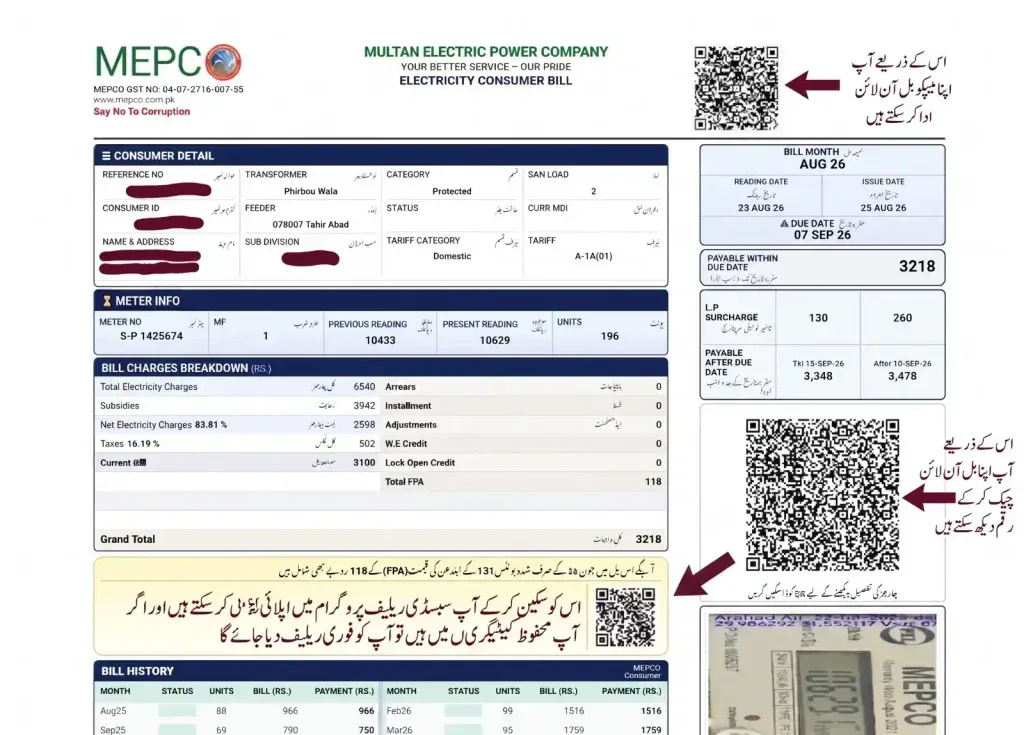
This QR code is given on the top right side of your bill. You can scan it and pay your bill at once.
- Step 1: Open your bank's mobile app (like HBL, Meezan, or Alfalah) and select the Scan QR option.
- Step 2: Then hold your phone's camera in front of the Raast QR code on the bill. The app will scan it automatically.
- Step 3: Your bill amount and details will appear on the screen. Just click and make the instant payment without any extra tax or charges.
QR Code for MEPCO Bill and Tax Details
This QR code is given in the middle on the right side of your bill, as you can also see in the picture. With it, you can check your bill amount. And if you want to see which hidden taxes or adjustments are added to the bill, you can follow these steps:
- Step 1: First, open any normal smartphone camera or QR scanner app.
- Step 2: As soon as you scan the QR code, a link will show on the screen, which will be the official PITC/MEPCO link. You just have to click on it, and your bill will show at once.
- Step 3: There, you will get the complete details of FPA (Fuel Price Adjustment), FBR income taxes, and the current month's electricity tariff slabs.
QR Code for Electricity Bill Subsidy Information
The Government of Pakistan gives a special relief package to consumers who use less than 200 units. To know the status of this subsidy, a dedicated scan point is also given on the bill. If you qualify, you will get clearly written relief on your bills every month:
- Step 1: Scan the Subsidy QR code given on the bill.
- Step 2: Then a link will appear. As soon as you click on it, you will reach another site.
- Step 3: There, you have to fill out the form given there.
- Step 4: Then you have to click on submit.
Your form will be submitted. If you have really been using less than 200 units continuously for the last 6 months, you will definitely get relief. But if you used even 201 units in a single month, then you are clearly in the non-protected category, and you will not qualify for this scheme.
Paying your electricity bill online is not just about avoiding long bank lines. You can also win big prizes from home. When you pay your MEPCO bill through any banking app or mobile wallet using Raast instant payment, your name is automatically included in the government's official Raast Lucky Draw. Through this draw, consumers who pay their bills digitally get excellent prizes every month, like an LED TV, a smartphone, and AirPods. You should also try your luck. Who knows, you might be the winner this time.
Pay MEPCO Bill Through Mobile Wallets and Banking Apps
You can pay your WAPDA bill from home in just a few seconds without any extra fees using the methods given below:
📱 Mobile Wallets (EasyPaisa / JazzCash)
1. Open the EasyPaisa or JazzCash app on your mobile and click on Bill Payment.
2. Select Electricity as the utility type and choose MEPCO from the list of companies.
3. Enter your 14-digit reference number, verify the amount, and confirm the payment by entering your PIN code.
🏦 Banking Apps (HBL, Meezan, myABL, etc.)
1. Log in to your bank's official digital app and navigate to the Utility Bill Payments section.
2. Select Add New Biller, choose MEPCO, and save your reference number.
3. After verifying the OTP (One-Time Password), press the Pay button and your bill will be cleared instantly.
Raast Bill Payment and Lucky Draw Prizes
If you want to join the lucky draw and win prizes, you will have to use the Raast gateway. How to do it is also explained here. You just have to follow this method exactly as it is.
- Step 1 (Scan the QR from your bank app): Open your bank's mobile application, select the Scan QR option, and scan the Raast QR code given on the bill.
- Step 2 (Confirm the instant payment): MEPCO and your bill payment details will appear on the screen automatically. Check them and confirm.
- Step 3 (Auto-enrollment and prizes): As soon as the payment through Raast is successful, your account will be auto-enrolled for the monthly lucky draw, where you can win an LED TV, mobile phones, and many more prizes.
MEPCO's official app is called MEPCO SMART. With this app, you can do almost everything related to your bill on your mobile. It has excellent features that can make your life easier.
- Step 1 (Download the app): Android users can search "MEPCO SMART" on the Google Play Store, and iPhone users can download it from the App Store. You can also download this app by visiting: https://mepco.com.pk/mepco-mobile-app/
- Step 2 (Create an account): Open the app and create your consumer account using your mobile number and reference details.
- Step 3 (Use the features): You get the following facilities directly inside the app:
- 1: Estimate your upcoming bill with the Bill Estimator.
- 2: Pay your bill and check the Paid or Unpaid status.
- 3: Apply for a new connection and track it.
- 4: Get your due date extended, or send an installment request if your bill is high.
- 5: Request meter replacement or update your tenant's CNIC.
- 6: Register complaints and track resolution with one click.
Enter your consumed units (kWh) to calculate an estimated monthly total:
After paying the bill online, many consumers remain confused about whether their bill is showing as paid in the system or not. If you have also paid your bill through EasyPaisa, JazzCash, or a bank app, then checking is very important because often you think you have paid the bill, but sometimes, due to a system glitch, your payment does not go through at all. That is why verifying it is important, so that you can avoid the fine. You can check your real-time paid and unpaid status through this easy method.
- Check with the reference number: Enter your 14-digit reference number on our website and open the bill.
- Find the "Payment Status" box: On the duplicate bill that opens, just below the pay QR code on the right side, there is a "Payment Status" section. If it shows zero (0) or "paid" written with a red stamp, then your bill is cleared.
- Unpaid status: If it shows "unpaid" written there, it means your bill has not been paid yet.
- Important note (data update time): Remember that when you pay your bill digitally, it can take 24 to 48 hours for the data to update on the main servers of PITC and MEPCO, so do not worry if you see the old status when you check at once.
If you also want to manage your home's electricity budget and track the consumption of previous months, MEPCO shows you the complete data for the last 1 year on the duplicate bill and also online. The way to check it is very easy:
- Find the 12-month table: When you open your duplicate bill online, you will see a small table on the left side in the middle-lower part of the page, which is called "Billing History."
- Compare units and amounts: This table has the names of the last 12 months, and in front of them it is written how many units you used in which month of the last year and how much you paid on the bill.
- Protected status tracking: With the help of this history, you can verify whether any of your bills in the last 6 months went above 200 units, because if it went above even once, your protected status ends.
A common consumer only looks at the total payable amount of the bill, but understanding every single line written on the bill is very important to avoid overbilling. While restructuring the system, the government and NEPRA have now added fixed monthly charges and dynamic taxes along with unit rates. Their details are given here.
Understanding Units, Meter Reading and Bill Amount
Present and previous reading: Two dates and values of meter reading are written on your bill. Your consumed units for this month are calculated by subtracting the previous reading from the present reading.
Cost of electricity: This is your actual bill, which is calculated by multiplying only your used units by their slab rate. No tax is included in it.
Due Date and Issue Date
Issue date: This is the date when MEPCO's billing system designs and prints your bill and sends it to you.
Due date: This is the last date to pay the bill. If you pay the bill after this date, an automatic 5% to 10% late payment surcharge (LP surcharge) is added to the current charges.
MEPCO Bill Slab Rates 2026 with Calculation
If you want to know what basic price MEPCO charges on the units you consume, then according to the government's and NEPRA's new uniform tariff rules, the following slabs apply. Remember that this is only the base energy price; taxes and adjustments are added on top of it:
| Category | Units Slab | Rate (Rs. / unit) |
|---|---|---|
| Protected | 1 – 100 Units | 10.54 |
| Protected | 101 – 200 Units | 13.01 |
| Non-Protected | 1 – 100 Units | 26.48 |
| Non-Protected | 101 – 200 Units | 32.09 |
| Non-Protected | 201 – 300 Units | 37.37 |
| Non-Protected | 301 – 400 Units | 43.92 |
| Non-Protected | 401 – 500 Units | 47.57 |
| Non-Protected | 501 – 600 Units | 49.43 |
| Non-Protected | 601 – 700 Units | 50.75 |
| Non-Protected | Above 700 Units | 52.27 |
💡 Easy Calculation Example (Protected Consumer - 200 Units): If you are protected and have used 200 units, then the first 100 units will be calculated at Rs. 10.54 (Rs. 1,054) and the next 100 units at Rs. 13.01 (Rs. 1,301). Your total base energy cost will be Rs. 2,355.
⚠️ Non-Protected Consumer Danger Alert: If you are non-protected and your meter crosses 201 units, you will not get the benefit of the previous cheaper slabs at all. Your entire bill will be multiplied directly at the heavy rate (Rs. 37.37), which suddenly increases the bill a lot.
The most important part of your bill is your tariff category (for example, A-1a for residential meters). The government has now made two major groups in it: Protected Consumers (who have been continuously using less than 200 units for the last 6 months and get cheap electricity) and Unprotected Consumers (who cross the 200-unit barrier and move to the expensive slab).
Apart from residential rates, your final bill amount includes new taxes and surcharges imposed by MEPCO and the federal government. The details are given in this table, which you can explore yourself:
| Tax / Surcharge Name | Description | Current Status and Rates (2026/2027) |
|---|---|---|
| Fixed Charges (Capacity) | Under NEPRA's new notification, Domestic Non-Lifeline consumers now have to pay monthly fixed charges according to the sanctioned load (kW) of their meter, even if the units are zero. | Protected: Nil. Non-Protected: Rs. 75 (1-200 units), Rs. 150 (201-300), Rs. 175 (301-400), Rs. 350-400 (401+ units) per kW/month. |
| GST (General Sales Tax) | Standard tax imposed by the federal government, which is applied to the whole bill and other taxes. | 18% on bills above 300 units. Bills up to 300 units are GST-free (0%). |
| FPA (Fuel Price Adjustment) | When the fuel used to make electricity (coal/LNG) becomes expensive in the international market, NEPRA recovers the difference from previous months in this head. | This rate is not permanent. It keeps changing every month (Rs. 0.48/unit in June 2026, Rs. 1.64/unit in April 2026). |
| QTA (Quarterly Adjustment) | Charged on every unit after every 3 months to manage the company's operational losses and distribution capacity. | About Rs. 0.52 per unit in the recent quarter. Changes every quarter. |
| Electricity Duty | Provincial government tax that depends on your connection type. | About 1.5-1.6% of the total electricity cost. |
| Withholding / Income Tax | According to FBR's new rules, if your bill in the domestic category exceeds a specific amount (Rs. 25,000), this tax applies. | Rates are lower for tax filers, while non-filers are charged up to 7.5%. |
| F.C. Surcharge (Financing Cost) | To manage the burden of the country's circular debt, this surcharge is taken from every consumer per unit. | Fixed flat rate. Currently about Rs. 1.43 per unit (after June 2026). |
The most important way to save electricity in Pakistan is to know at what time the electricity rate is cheap and at what time it is expensive. If you keep heavy appliances (like AC, water pump, or iron) switched off during specific hours, you can get big relief on your bill.
In MEPCO's system, the 24 hours of the day are divided into two parts. Peak hours are the hours when electricity demand is high across the country, and the unit rate is very expensive, while in off-peak hours the electricity rate is cheap. The official timings according to the season are given below:
| Season | Months | Peak Hours | Off-Peak Hours |
|---|---|---|---|
| Summer | April to October | 6:30 PM – 10:30 PM | Remaining 20 hours |
| Winter | November to March | 5:00 PM – 9:00 PM | Remaining 20 hours |
Tips to Reduce Your Electricity Bill
- Tip 1 (Peak hours management): During peak hours, completely stop using the air conditioner (AC), washing machine, water pump, grass cutting machine, roti maker, oven, and iron.
- Tip 2 (Inverter technology): Replace your home's old fans and appliances with 5-star-rated inverter technology and LED bulbs, which save up to 60% electricity.
- Tip 3 (Unplug idle devices): Switch off the power to electronic devices (TV, chargers, computers) that are not in use at the switchboard, because they consume electricity even in standby mode.
If your bill has a wrong meter reading, or extra units have been added, or someone in your area is stealing electricity and is not stopping despite being warned, then you can register your complaint from home and get your bill corrected and all related issues resolved.
How to Report an Incorrect MEPCO Bill:
- Meter photo: If the reading on the bill is more than your actual meter, first take a clear picture with your mobile of the total units (kWh) running on your meter's screen.
- Online portal: Go to the Ministry of Energy's official portal,
ccms.pitc.com.pk, and click on "Register Complaint" to upload your reference number and the meter's picture. - Manual verification: If you cannot do it online, submit the application and picture at your nearest MEPCO sub-division office (SDO). After verification by the operational staff, a corrected bill will be issued to you within 24 hours.
MEPCO Complaint and Helpline Numbers
- Central helpline: For any emergency or meter complaint, call 118 directly.
- Toll-free number: You can also register your call for free on MEPCO's toll-free number 0800-63726.
- SMS complaint: From your mobile, you can send a complaint about a power outage or load-shedding via SMS to 8118.
According to the Power Information Technology Company (PITC) and the Ministry of Energy's official portal, nowadays fraudsters are looting consumers' money through fake calls and messages. To stay safe from this fraud, keep the following points in mind so that you stay safe from any big loss:
- No direct accounts: Remember, no representative of MEPCO or PITC will ever ask you to transfer money to any individual EasyPaisa, JazzCash, or direct bank account.
- Official bills only: Fees for bill adjustment, meter repairs, fine cancellation, or new connection are only paid at the official bank bill branch counter or through secure utility apps.
- Do not engage: If you get any such suspicious call or message where a direct transfer is demanded, never give them any personal details or money. Cut the call at once and put the number in the spam list or block it.
- Immediate reporting: Immediately report any such scam activity or threatening call by calling the 118 helpline, so that fake numbers can be blocked and other consumers can stay safe along with you.
Multan Electric Power Company (MEPCO) is the largest electricity distribution company of WAPDA in terms of geographical area. It covers 9 major administrative circles and about 50 sub-divisions across South Punjab. If you belong to any of the areas given below, then you are an active MEPCO consumer:
| MEPCO Operational Circle | Covered Districts & Major Areas |
|---|---|
| Multan Circle | Multan City, Multan Cantt, Shujabad, Jalalpur Pirwala, and Lodhran. |
| Bahawalpur Circle | Bahawalpur City, Ahmadpur East, Yazman, Khairpur Tamewali, and Hasilpur. |
| Rahim Yar Khan Circle | Rahim Yar Khan, Khanpur, Sadiqabad, and Liaqatpur. |
| Muzaffargarh Circle | Muzaffargarh, Kot Addu, Alipur, Jatoi, and Chowk Sarwar Shaheed. |
| D.G. Khan Circle | Dera Ghazi Khan, Taunsa Sharif, Rajanpur, Jampur, and Rojhan. |
| Sahiwal Circle | Sahiwal City, Chichawatni, Pakpattan, and Arifwala. |
| Vehari Circle | Vehari City, Burewala, and Mailsi. |
| Khanewal Circle | Khanewal City, Kabirwala, Mian Channu, and Jahanian. |
| Bahawalnagar Circle | Bahawalnagar, Chishtian, Haroonabad, Fort Abbas, and Minchinabad. |
If you are entering your reference number and the screen shows "Bill Not Found" or an error, there can be some important technical reasons for it. To avoid this problem and get your bill, follow these simple steps:
- Check Your Digits: First of all, carefully check whether you have entered all 14 digits correctly or not. If even a single numerical digit is missed or wrong, the system cannot find your record. If you are using the 10-digit Customer ID, carefully change the switch tab in the search box.
- Verify Batch and Sub-Division Changes: Sometimes MEPCO officially changes the first few digits (batch number) of your reference number to manage the load of your area or to create a new sub-division. If your old number is not working, check this month's bill of your close neighbor and see whether their subdivision code has changed, and if so, immediately visit the nearest MEPCO office to get this issue resolved.
- Wait for Bill Issuance Cycle: MEPCO does not issue bills of all South Punjab areas on the same date; they come in batches. If the data is not loading on the website, it means your batch's current month bill has not been uploaded on the server yet. Wait a few days and check again.
- Clear Browser Cache or Blocked Pop-ups: If the page goes completely blank, your mobile browser may have blocked the official bill window. Go to the browser settings and Allow Pop-ups, or open the page in incognito mode and check. Your bill will show instantly.
- Internet Issues: Often, the internet is very slow, due to which the site does not load and shows bill not found. So whenever you check the bill, always check your network first.
In short, if your MEPCO bill is lost or arrives late, then instead of standing in long bank lines, you can instantly view and download your duplicate web bill on our site using your 14-digit Reference Number or 10-digit Consumer ID. You can also safely pay your bill through new digital methods like Raast QR Code and mobile wallets to join the monthly lucky draw, and verify the complete breakdown of new taxes and surcharges.
Important Disclaimer: We are not an official website of MEPCO, PITC, or WAPDA. We are an independent informational platform, but the billing data and all information shown on our portal is fetched in real time directly from official servers, which is why every single detail here is 100% real, accurate, and verified.